In IceBox, playing Tetris backwards means fighting a screen that pushes incomplete lines from the bottom while you frantically fire inverted blocks down to plug the gaps.
Flipping the Tetris playfield upside down
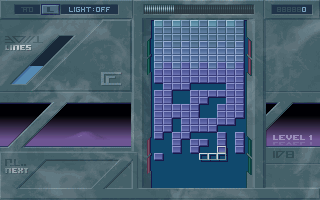
Most puzzle games from 1993 were content to tweak scoring mechanics or tweak gravity slightly, but developer Luna took a far more literal approach to destabilising the formula. In IceBox, the familiar tension of watching a stack build up from the bottom of your monitor gets entirely reversed. Incomplete rows of blocks continuously push upward from the floor, forcing you to act as a defender rather than a builder. Instead of waiting for falling shapes to settle neatly at the base, you are given random tetrominoes that drop upward into the emerging grid, effectively using them as mortar to clear incoming rows before they hit the ceiling.
The immediate shift in spatial awareness is jarring if your muscle memory comes from years of classic action-puzzlers. Because you are dropping blocks into a rising wall rather than building a tower on solid ground, any single mistake leaves a hollow gap underneath that is almost impossible to fix once the line advances. The perspective requires constantly scanning the bottom of the screen to see what incomplete pattern is arriving next, while simultaneously aiming your current shape into the falling lane.
Mouse controls make precision placement surprisingly accessible
Where many early DOS titles struggled with clunky keyboard layouts for fast-paced action, IceBox handles its movement with direct mouse input. Dragging a shape across the columns and turning it over before dropping it into place feels smooth, letting you flick blocks into tight side gaps that would take multiple keypresses in traditional setups. This control choice was practical for an indie project released in 1993, cutting out input delay entirely during fast sequences.
That speed is necessary because leaving any protruding fragments guarantees disaster within a few seconds. When you fail to clear a row, the leftover stub acts as a wall, catching your subsequent blocks prematurely and trapping wide open spaces below them. The core loop rapidly devolves into emergency triage: choosing whether to fill a deep hole correctly or dump an awkward shape off to the side just to keep the upper screen clear.
Where the mechanics freeze up
For all its clever mechanical tricks, IceBox suffers from a severe lack of long-term variety that kept it from reaching a wider audience. Publisher Luna crafted a brilliant five-minute gimmick, but failed to wrap it in a broader game structure. There are no distinct level themes, no specialized power-up blocks to clear troublesome columns, and no head-to-head multiplayer mode to capitalize on the frantic pace.
What you see in the first two minutes is the exact challenge you face twenty minutes later, with the only variable being the speed at which the bottom rows push upward. When compared to other commercial titles in the puzzle genre from the early nineties, it feels more like a proof-of-concept prototype than a complete commercial product. The single audio track and minimalist visual presentation do little to pull you back in once the initial novelty of the inverted gravity wears off.
- Inverted playfield where incomplete lines rise continuously from the screen base.
- Direct mouse control for moving, rotating, and shooting blocks into position.
- Survive-as-long-as-you-can scoring system with ramping speed scaling.
Play IceBox online with no setup required
Despite its lightweight feature set, spending half an hour with this obscure experiment is well worth the time for anyone who loves clever mechanical twists on established formats. The core idea of active defense over block-stacking remains genuine fun in short bursts, even if the lack of modes limits its longevity. The precise mouse control holds up surprisingly well, providing a crisp, responsive feel that many larger DOS releases missed entirely.
You can launch the full 1993 IceBox MS-DOS game directly in your web browser without installing emulator frontends or tweaking system files. If you want to play IceBox online right now, click above to load up this forgotten piece of indie history, test your inverted spatial reasoning, and see how long you can keep the rising wall from reaching the top of your screen.